Resource Hub

Zorq AI Resource Hub

The Zorq AI Resource Hub is built to help creators, marketers, businesses, educators, and AI tool users create better images, videos, voices, lip sync clips, motion content, and AI-powered creative projects.

Use this page when you want a simple starting point. Learn how to write better prompts, choose the right model, plan your workflow, and turn your idea into a cleaner final result with Zorq AI.

Prompt GuideModel NotesCreator WorkflowsImage GenerationVideo GenerationMotion ControlLip SyncVoice CloningMultiGen
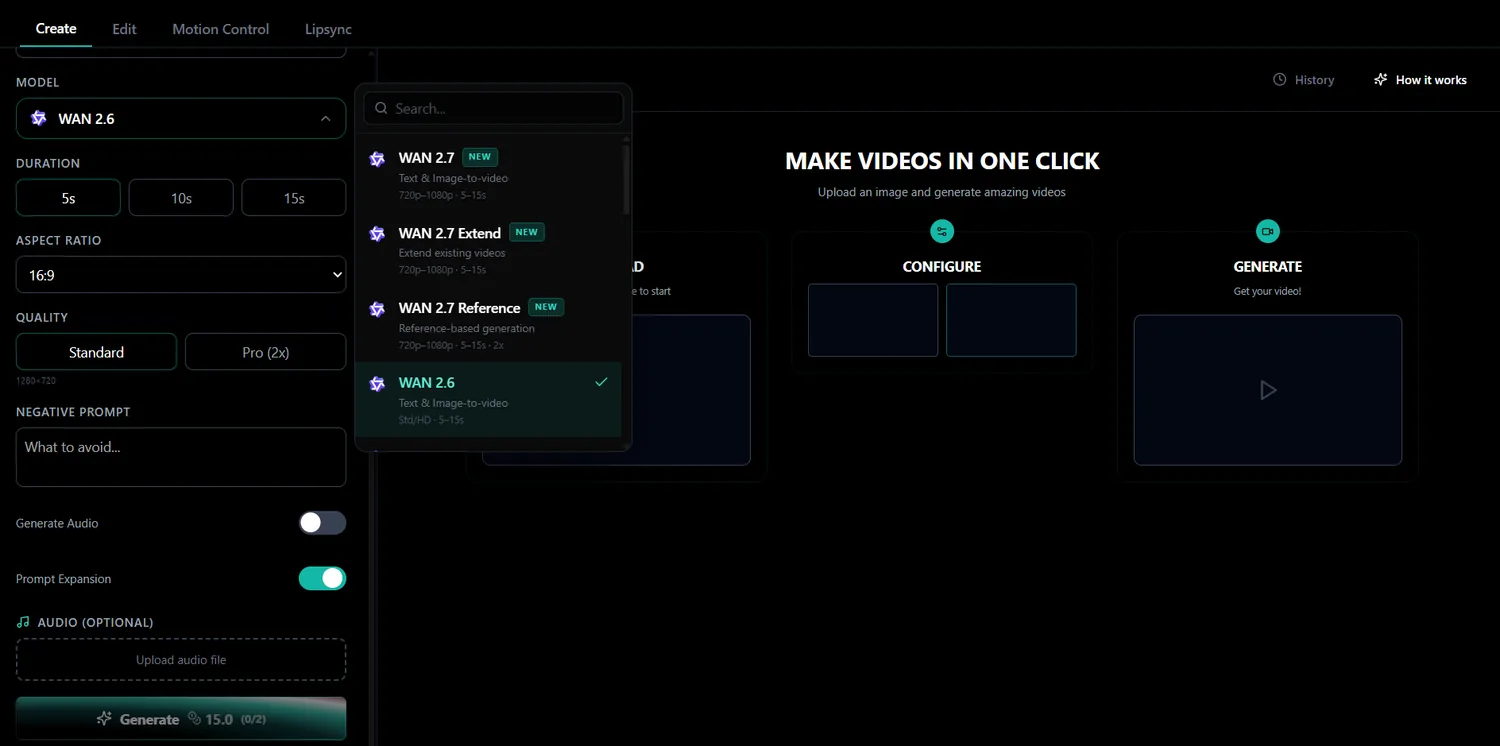
Zorq AI create workspace with prompt and model settings
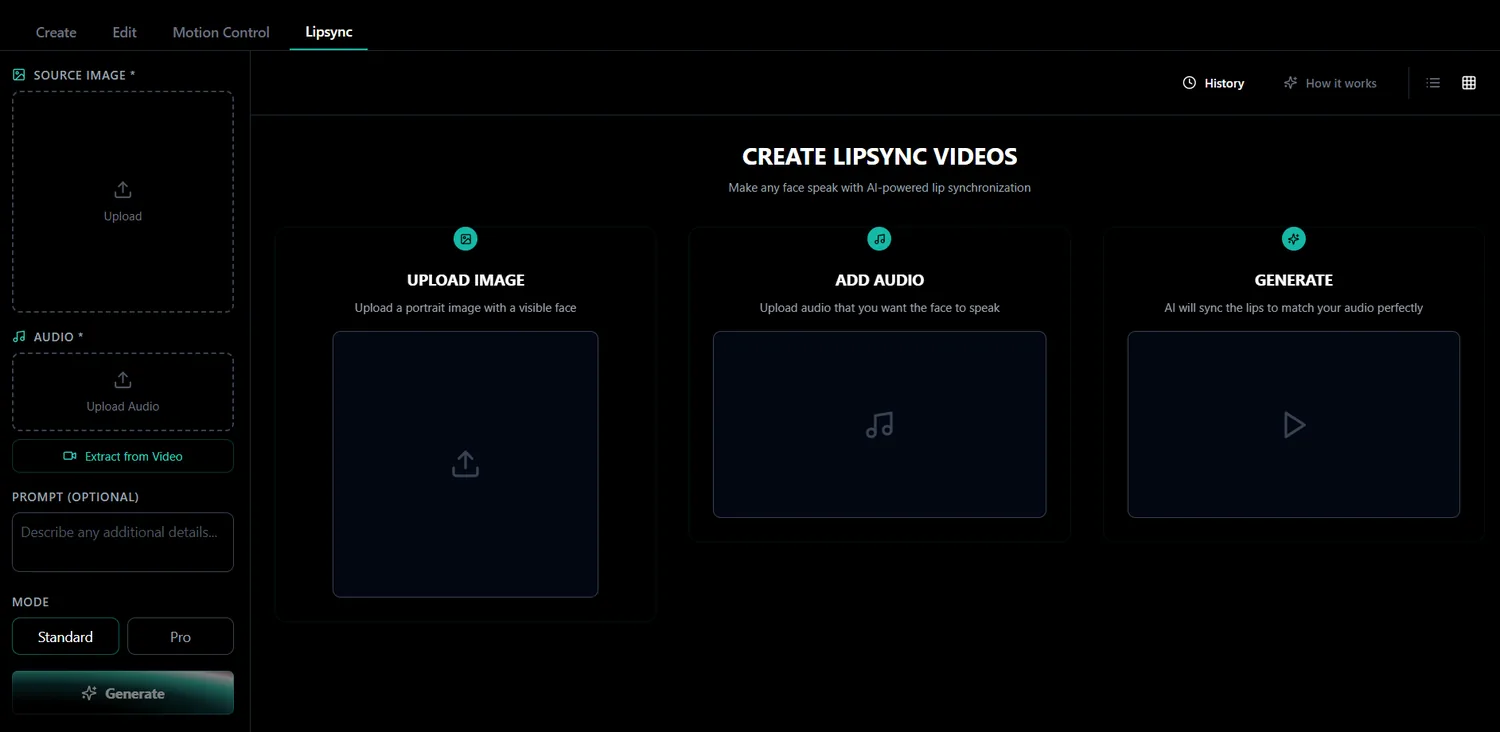
Zorq AI lip sync workspace
Zorq AI image generation workspace
What you can learn here

Use Zorq AI with a clearer creative plan

Zorq AI gives users several creative paths. You can create images, generate videos, animate uploaded images, edit videos, control motion, build lip sync clips, generate voice content, and create multiple variations with MultiGen.

Plan a video before generating it
Write stronger AI prompts
Choose a model based on your goal
Create better product visuals
Build social media clips faster
Turn images into videos
Create lip sync content from audio
Use motion control for character movement
Generate voice or narration workflows
Compare creative directions with MultiGen
Start with your creative goal

Choose the tool based on what you want to make

Before choosing a tool, start with the result you want. This makes prompts cleaner and helps you pick the right Zorq AI workflow faster.

Prompt to video

If you want to create a video from an idea

Use Text to Video AI. Write a prompt that describes the subject, action, camera movement, mood, lighting, and final platform.

Best for: product videos, short social clips, story scenes, ads, brand visuals, and cinematic drafts.
Image to video

If you already have an image

Use Image to Video AI. Upload a product photo, portrait, concept image, character visual, or scene image, then guide the motion with a short prompt.

Best for: turning still images into motion clips, social videos, AI influencer scenes, product promos, and visual storytelling.
Image creation

If you want to create images

Use AI Image Generator or Zorq AI Image Models. Choose a model based on the type of image you need, then write a clear prompt.

Best for: product images, thumbnails, portraits, social graphics, ad creatives, website visuals, and AI persona assets.
Motion control

If you want controlled movement

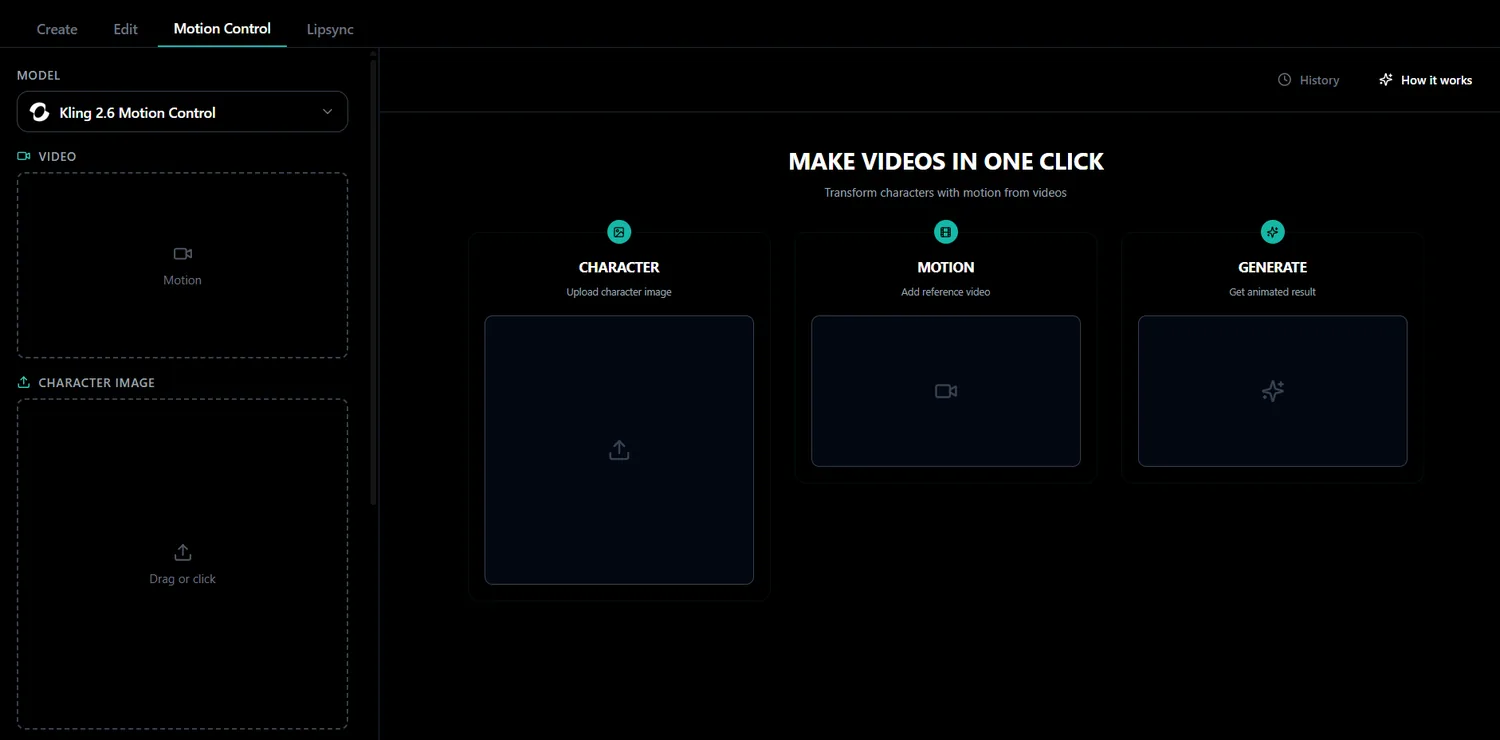
Use AI Motion Control or Kling Motion Control. Start with a character, product, or reference movement and guide how the motion should work.

Best for: character animation, AI influencer movement, product motion, gesture control, and performance-style clips.
Lip sync

If you want a face to speak

Use AI Lip Sync Generator. Upload a source image with a visible face, add audio, then generate a talking video.

Best for: talking avatars, product explainers, AI influencer videos, training clips, and short social messages.
Voice

If you want voice content

Use Voice Cloning AI or Audio Generation. Create narration, voice-style content, or text-to-speech audio for videos and creator workflows.

Best for: product explainers, avatar videos, training content, social voiceovers, and storytelling clips.
MultiGen

If you want multiple creative options

Use MultiGen AI Generator. Create several images or video directions from one idea, then compare the strongest results.

Best for: ad testing, content planning, AI influencer assets, campaign ideas, product visuals, and creative exploration.
Prompt Guide

Write prompts that give Zorq AI better direction

A good prompt does not need to be long, but it should be clear. Start with the subject, action, setting, style, camera or composition, mood, and final use.

Simple prompt formula

Subject + action + setting + style + camera or composition + mood + final use

A premium black smartwatch on a reflective studio table, slow camera push-in, soft blue lighting, clean tech commercial style, vertical short video for social media.

Prompt Guide for Text to Video AI

Use text to video when you are starting with only an idea.

Good prompt structure

Describe the main subject, what happens in the scene, background or location, camera movement, lighting, mood, video style, and platform or format.

Example

A young creator sitting at a modern desk, opening a laptop as soft neon light fills the room, slow cinematic push-in, realistic style, calm evening mood, vertical video for Instagram Reels.

Better prompt tip

Do not ask for too many actions in one short clip. One clear scene usually works better than five different actions.

Prompt Guide for Image to Video AI

Use image to video when you already have a strong visual.

Good prompt structure

Describe subtle subject movement, camera motion, background motion, lighting mood, product reveal, and scene energy.

Example

Animate this product image with a slow cinematic zoom, soft studio reflections, gentle background light movement, premium ecommerce ad style, clean and smooth motion.

Better prompt tip

The uploaded image should be clear, sharp, and focused. A weak image usually creates a weaker video.

Prompt Guide for AI Image Generation

Use image generation when you need a still visual first.

Good prompt structure

Describe subject, style, background, lighting, composition, color direction, output format, and final use.

Example

A clean product image of a black wireless headphone on a soft gray background, premium lighting, subtle shadow, modern tech ad style, square format for social media.

Better prompt tip

If the image is for ads or ecommerce, keep the subject clear and avoid messy backgrounds.

Prompt Guide for Motion Control

Use motion control when the movement matters.

Good prompt structure

Describe character or object, motion type, reference movement, timing, camera style, and final video use.

Example

Transfer the reference movement to the character, smooth body motion, natural arm movement, stable camera, clean social video style.

Better prompt tip

Use a clear reference motion when possible. Motion control works best when the movement goal is easy to understand.

Prompt Guide for Lip Sync

Use lip sync when a face needs to speak with audio.

Good prompt structure

Prepare a clear face image, clean audio, a short script, simple background, and natural voice pacing.

Example

Short product announcement with a friendly tone, clear pacing, and natural delivery for a social media video.

Better prompt tip

Use clean audio and a visible face. Lip sync quality depends heavily on the source image and audio clarity.

Prompt Guide for Voice and Audio

Use voice tools when you need narration, speech, or voice-led content.

Good prompt structure

Start with the main message, use short sentences, match the tone to the video, avoid complicated wording, and review pronunciation before final use.

Example

Create product videos faster with Zorq AI. Start with a prompt, choose your model, and turn your idea into a polished visual clip.

Better prompt tip

A clean script usually sounds better than a crowded paragraph.
Tool previews

Zorq AI workflows from prompt to generation

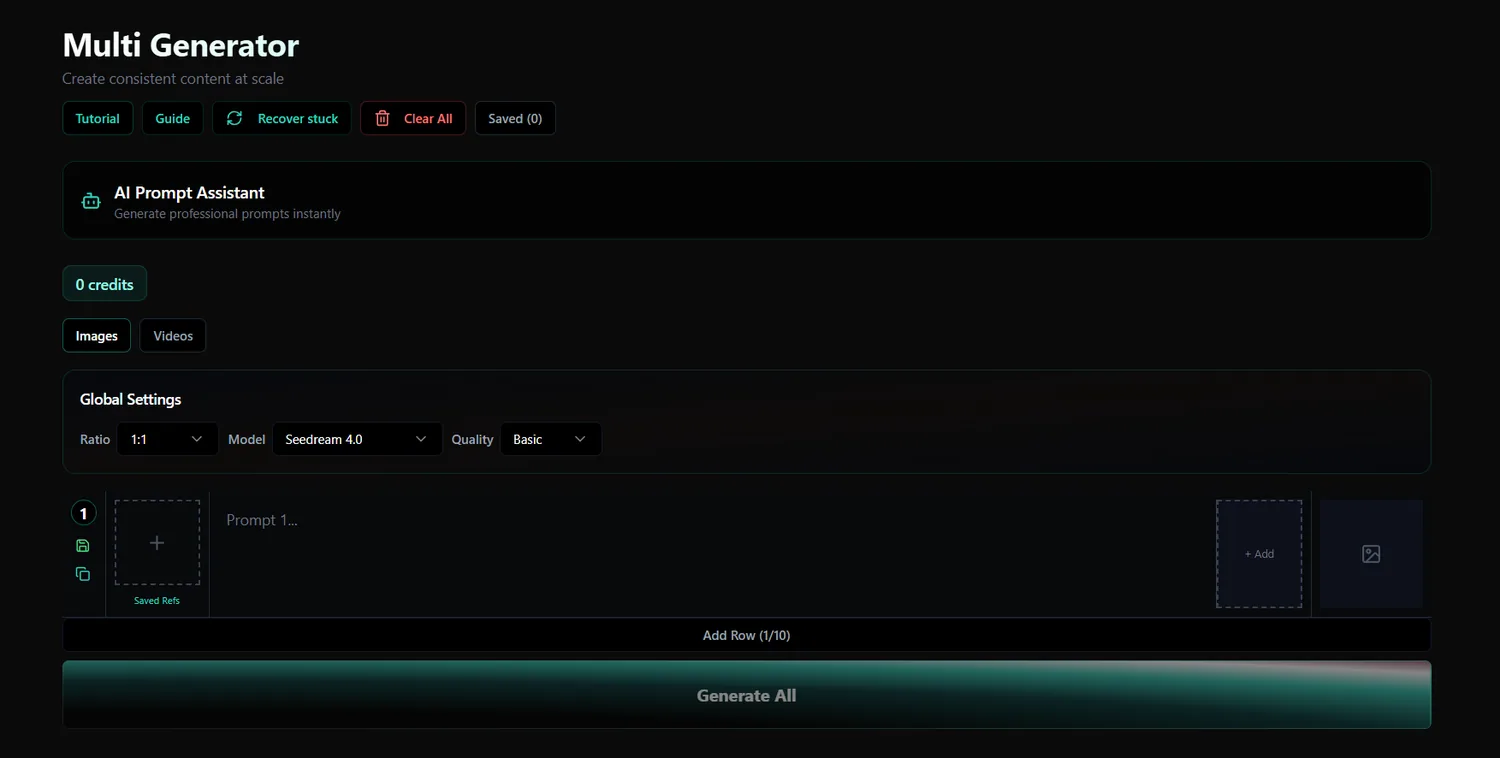
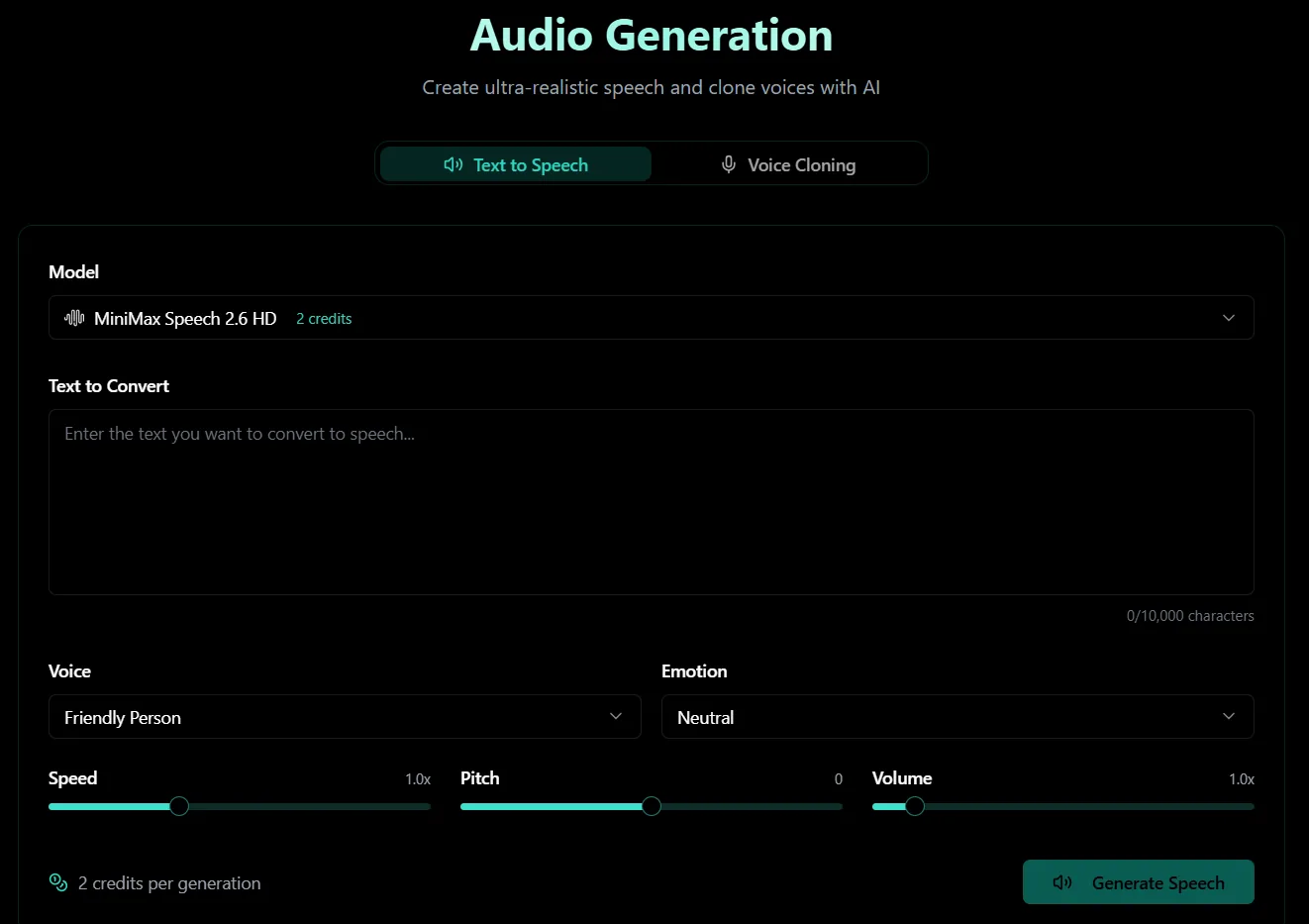
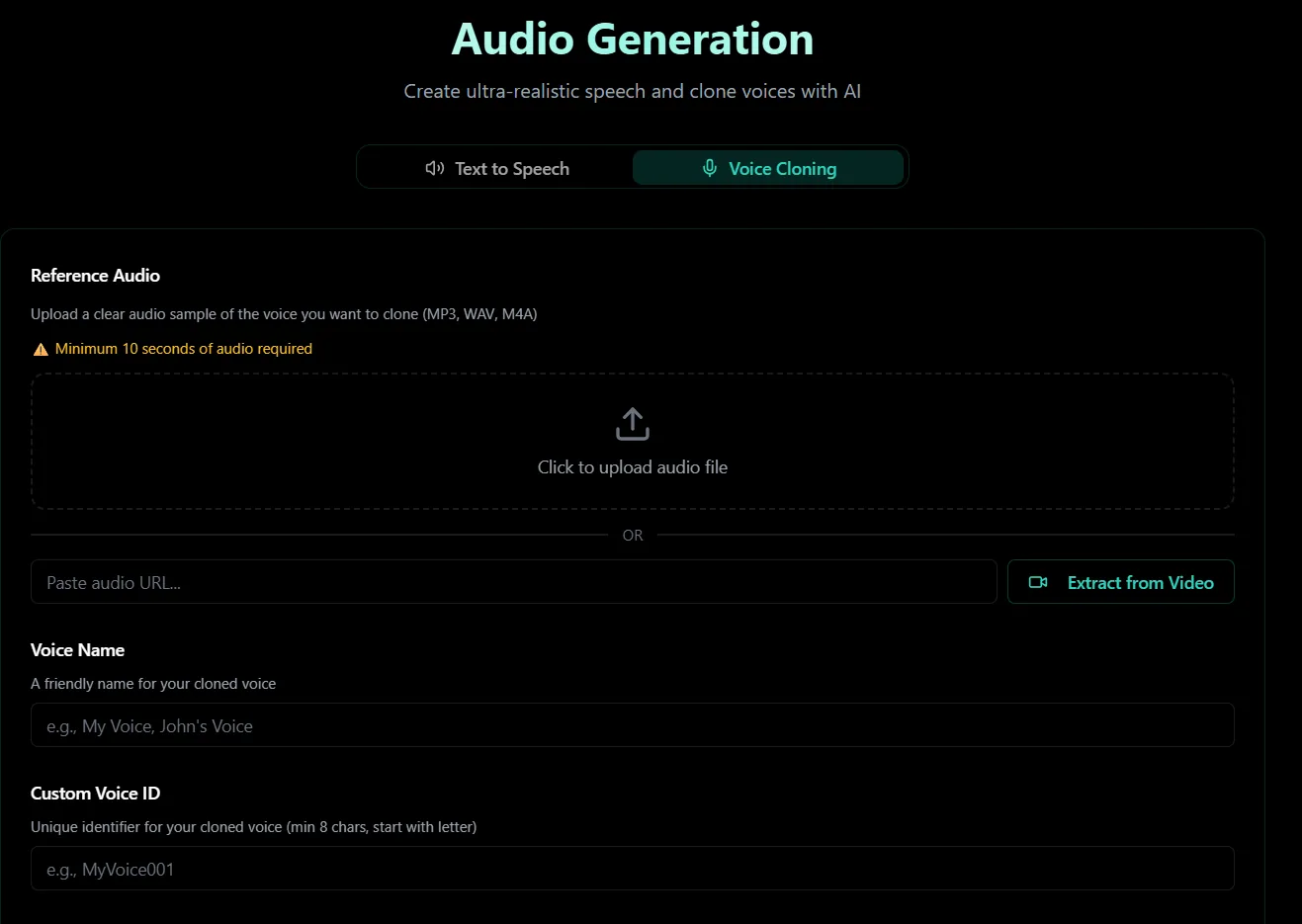
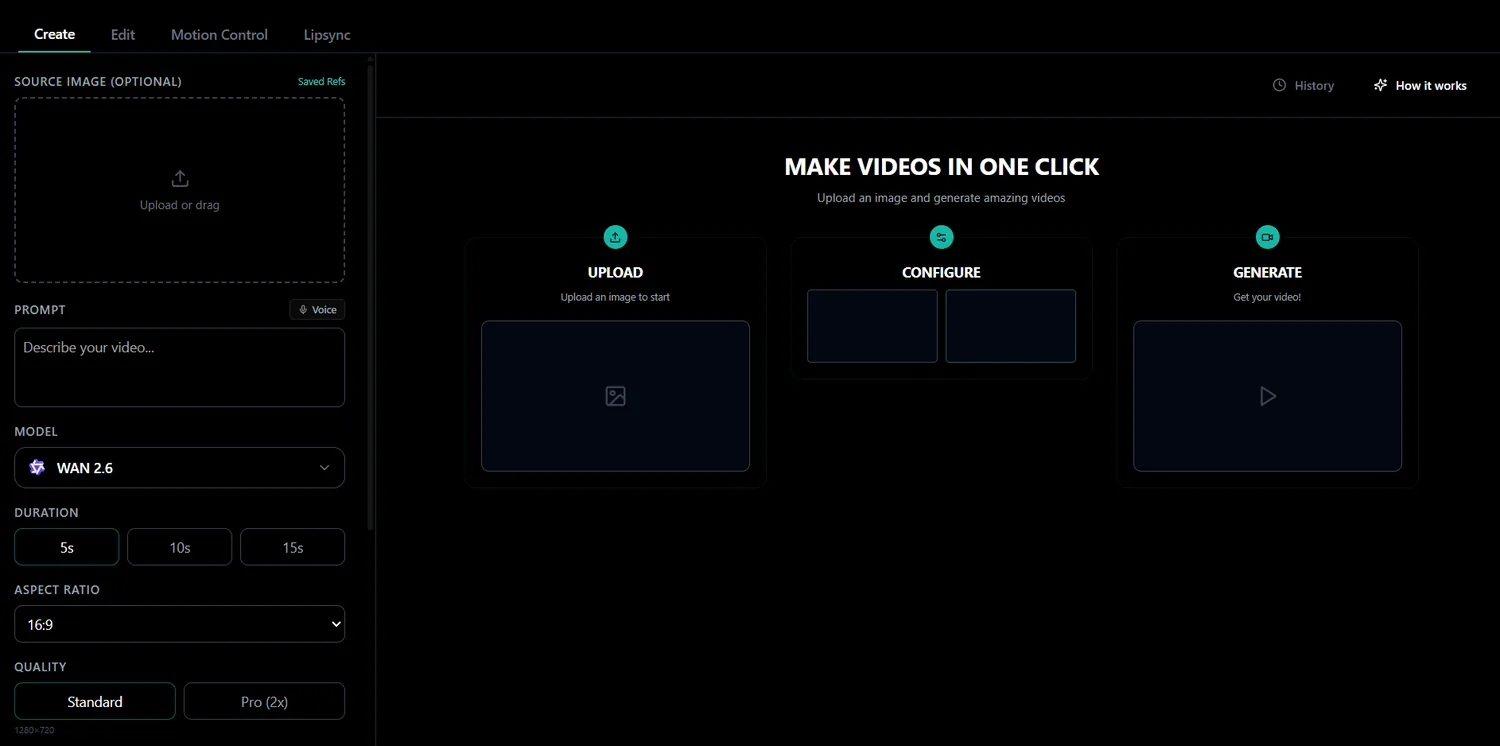
These interface previews show how Zorq AI supports creation, editing, motion control, lip sync, MultiGen, image generation, and voice workflows.

Zorq AI create workspace for video generation and image upload
Zorq AI model selector with video creation settings
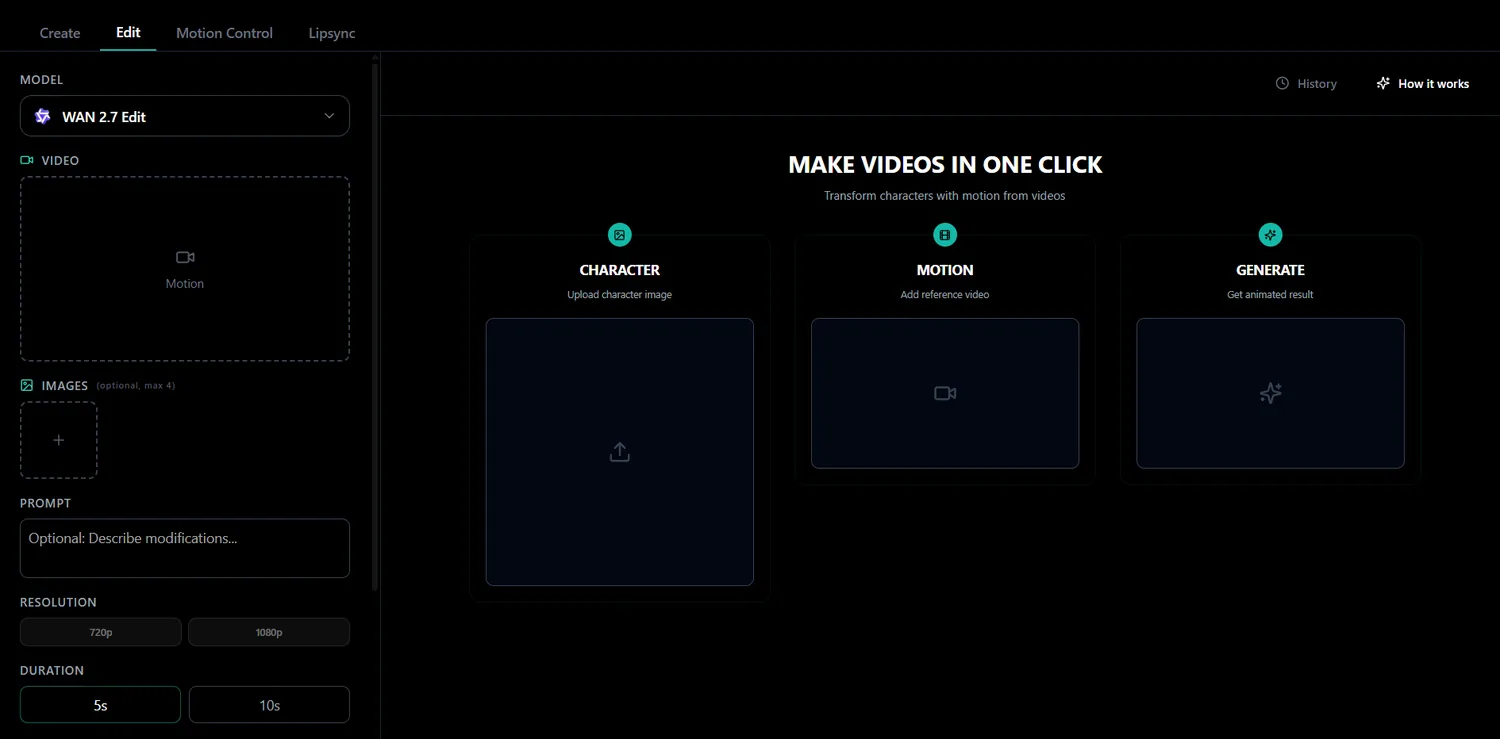
Zorq AI edit workspace for AI video editing
Zorq AI motion control workspace with character and motion panels
Zorq AI lip sync workspace for source image and audio
Zorq AI MultiGen workspace for batch creative generation
Zorq AI image generation prompt workspace
Zorq AI text to speech audio generation workspace
Zorq AI voice cloning workspace for reference audio
Model Notes

Choose models by task, not by name only

Different models are useful for different tasks. The best model depends on whether you need speed, cinematic quality, image-to-video, motion control, image editing, or readable text inside images.

For fast creative testing

Use faster model options when you want to test ideas quickly.

Good for: First drafts, prompt testing, social content ideas, campaign exploration, multiple variations

For cinematic video quality

Use stronger video models when you want polished motion, better scene direction, stronger lighting, and more cinematic output.

Good for: Product videos, brand scenes, story clips, cinematic social content, campaign visuals

For image-to-video workflows

Use image-to-video models when the source image already looks strong and you want to preserve that visual direction while adding motion.

Good for: Product shots, AI portraits, character images, concept art, social visuals

For motion control

Use motion-control models when you care about movement accuracy, character performance, gestures, or reference-based motion.

Good for: AI influencer motion, character movement, dance-style clips, product movement, gesture control

For AI image generation

Use image models based on your image goal.

Good for: Product visuals, thumbnails, ad creatives, social graphics, portraits, concept art, brand mockups

For image editing

Use editing-focused models when you already have an image and want to improve, adjust, or transform it.

Good for: Background changes, product edits, visual cleanup, style changes, campaign revisions

For text inside images

Use models that handle typography better when you need posters, labels, thumbnails, or social graphics with readable text.

Good for: Posters, mockups, product labels, YouTube thumbnails, educational visuals
Creator Workflows

Practical paths from idea to finished content

Use these workflows when you want a simple step-by-step plan before generating content with Zorq AI.

Workflow 1: Product Promo Video

Best for: Ecommerce sellers, product marketers, startups, agencies, and social media teams.

  1. Create or upload a clean product image, or generate one using Zorq AI Image Models.
  2. Use Image to Video AI to animate the product with a camera push-in, product reveal, rotation, or cinematic lighting.
  3. Add voice or text-to-speech for a short product message if needed.
  4. Use AI Lip Sync Generator only if a spokesperson or avatar explains the product.
  5. Export the final clip for Reels, Shorts, product pages, ads, or launch campaigns.

Workflow 2: Social Media Video from a Prompt

Best for: Creators, YouTubers, social media managers, and small businesses.

  1. Write the scene with subject, action, background, mood, and platform.
  2. Use Text to Video AI to generate the first clip from your prompt.
  3. Refine camera movement, lighting, style, and scene clarity.
  4. Use MultiGen when you want multiple options.
  5. Choose the version with the clearest hook and best platform fit.

Workflow 3: AI Influencer Content

Best for: AI influencer creators, digital brands, social teams, and creative agencies.

  1. Use AI Image Generator or AI Image Models to create a consistent portrait or lifestyle scene.
  2. Use MultiGen to test outfits, backgrounds, moods, and post styles.
  3. Use Image to Video AI or Motion Control to add movement.
  4. Use Voice Cloning AI or AI Lip Sync Generator if the persona needs to speak.
  5. Keep key details consistent, including face style, fashion direction, color palette, niche, and content tone.

Workflow 4: Cinematic Story Clip

Best for: Filmmakers, creators, brand teams, educators, and concept artists.

  1. Write one simple story moment. One strong scene works better than a long story.
  2. Add camera direction, lighting, mood, action, and visual style.
  3. Choose a cinematic-focused video model direction for better visual quality.
  4. Review motion, camera behavior, realism, and pacing.
  5. Use the result for concept trailers, campaign ideas, YouTube content, or brand storytelling.

Workflow 5: Talking Avatar or Explainer

Best for: Educators, trainers, product teams, support teams, and creators.

  1. Create or upload a clear portrait with a visible face.
  2. Prepare clean audio, voice generation, or text-to-speech.
  3. Use AI Lip Sync Generator to sync the face to the audio.
  4. Add the clip into a product explainer, training video, social message, or course material.
  5. Review accuracy, tone, voice rights, and platform rules before publishing.

Workflow 6: Thumbnail and Video Pair

Best for: YouTubers, educators, bloggers, and content creators.

  1. Use AI Image Models to create several thumbnail visuals.
  2. Choose the strongest image with the clearest subject and visual hook.
  3. Use Image to Video AI to animate the thumbnail concept.
  4. Create a matching short video with Text to Video AI or Image to Video AI.
  5. Keep the same colors, subject style, and mood across the thumbnail and video.

Workflow 7: MultiGen Creative Testing

Best for: Agencies, marketers, product teams, and creators who need options fast.

  1. Choose one campaign idea, such as a product ad, social hook, persona visual, or brand scene.
  2. Use MultiGen to create several images or video concepts.
  3. Compare subject clarity, style, brand fit, platform fit, and quality.
  4. Select the strongest result and refine it.
  5. Move the best output into image-to-video, motion, voice, or lip sync workflows.
Zorq AI Tool Map

Use this quick guide to choose the right tool

GoalBest Zorq AI Tool
Create a video from textText to Video AI
Turn an image into videoImage to Video AI
Create still imagesAI Image Generator
Compare image modelsZorq AI Image Models
Compare video modelsZorq AI Video Models
Add controlled movementAI Motion Control
Use Kling motion workflowsKling Motion Control
Make a face speakAI Lip Sync Generator
Create narration or voice-style contentVoice Cloning AI / Audio Generation
Generate multiple creative optionsMultiGen AI Generator
Build AI persona visualsAI Influencer Generator
Create premium-looking scenesCinematic Video Creation
Prompt templates

Copy a structure, then make it your own

These templates give users a faster start for product videos, social clips, cinematic scenes, AI images, product images, AI influencers, and lip sync scripts.

Product Video Prompt

A premium [product name] on a clean studio surface, slow cinematic push-in, soft lighting, subtle reflections, modern commercial style, short vertical video for social media.

Social Media Clip Prompt

A [subject] in a modern setting, energetic motion, clean background, bright lighting, fast social media style, short vertical clip for Reels or Shorts.

Cinematic Scene Prompt

A [subject] in a [setting], slow camera movement, dramatic lighting, cinematic mood, realistic style, shallow depth of field, emotional visual tone.

AI Image Prompt

A high-quality image of [subject], [style], [background], [lighting], [color mood], clean composition, made for [final use].

Product Image Prompt

A clean ecommerce product image of [product], premium studio lighting, soft shadows, minimal background, sharp detail, modern brand style.

AI Influencer Prompt

A realistic AI persona wearing [outfit], in [setting], [mood], social media creator style, clean lighting, consistent face style, vertical format.

Lip Sync Script Prompt

Create a short friendly script for a talking avatar explaining [product/topic] in a clear, natural voice for a 15-second social video.
Common mistakes

Avoid the issues that weaken AI results

Most weak outputs come from vague prompts, poor source files, unsupported expectations, or skipped review.

Using vague prompts

Weak prompt: “Make a cool video.” Better prompt: “A premium smartwatch on a reflective black table, slow cinematic push-in, blue studio lighting, clean tech ad style.”

Asking for too much at once

Keep one main idea per generation. Too many actions can make the result messy.

Using low-quality source images

Image-to-video works better when the uploaded image is sharp, clear, and well-composed.

Ignoring model choice

Different models create different results. Choose based on the task, not only the model name.

Publishing without review

Always check the output before using it in ads, client work, education, or public content.

Forgetting usage rights

Make sure you have rights to uploaded images, voices, logos, references, and final outputs.

Responsible AI creation

Review before you publish

Zorq AI is a creative tool, but users should still create responsibly. AI can speed up creative work, but human review is still important.

Is the content accurate?
Do you have rights to the image, voice, logo, or reference?
Could the output mislead viewers?
Does it follow the platform rules?
Is it safe for ads, commercial use, or public sharing?
Does it respect real people, brands, and creators?
Recommended learning path

New to Zorq AI? Follow this simple path

01

Start with AI Image Generator

Create a few strong still visuals.

02

Try Image to Video AI

Turn your best image into motion.

03

Use Text to Video AI

Create a video directly from a prompt.

04

Test MultiGen

Generate multiple versions and compare results.

05

Explore Motion Control

Use movement tools when you need more control.

06

Try Lip Sync and Voice

Create talking clips, explainers, or avatar videos.

07

Compare Models

Use Image Models and Video Models pages to pick the best model for each task.

FAQ

Questions before using the Resource Hub

Quick answers for creators, marketers, businesses, and AI tool users who want better results from Zorq AI.

The Zorq AI Resource Hub is a learning page that helps users understand prompts, models, tools, and creative workflows inside Zorq AI.

It is for creators, marketers, agencies, ecommerce sellers, educators, YouTubers, startups, and AI tool users who want better results from Zorq AI.

Start with prompt writing. A clear prompt improves image generation, video generation, motion control, and creative testing.

Text to Video AI starts from a written prompt. Image to Video AI starts from an uploaded or generated image.

MultiGen helps you create multiple creative options from one idea so you can compare results faster.

Use Motion Control when character movement, gestures, body motion, product motion, or reference movement matters.

Use Lip Sync when you want a face, avatar, or AI persona to speak with audio.

No. Zorq AI is designed to help users create with prompts, images, models, and guided workflows. Better planning still improves results.

Yes, but always review usage rights, commercial terms, uploaded materials, and generated outputs before using them in ads, client work, or public campaigns.

No. AI results can vary. Strong prompts, good source files, the right model, and careful review help improve final results.

Start creating

Use the Resource Hub as your guide, then build with Zorq AI

Write a clear prompt, choose the right tool, pick the right model, generate your first result, and refine the strongest version.

Better prompts · Smarter model choices · Cleaner workflows · Faster creative results